Hard Drive Apple iMac G5 Repair Story
When an Apple iMac G5 locks up on you, it might mean the hard drive is bad.
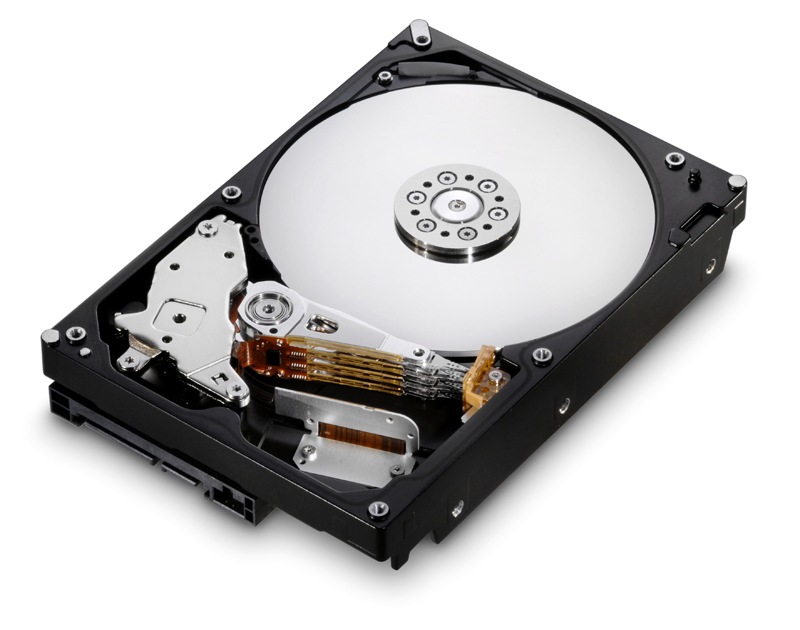
Many folks have contacted me over the past number of months about their Apple iMac G5 problems they have been having because of bad motherboards or power supplies. Well, I thought I would share a story of my own, in regards to trouble shooting a bad iMac G5, in the hopes that it might help some of the folks out there in Apple iMac Computer land.
I recently picked up a used iMac that was giving the previous owner fits, in that it would eventually, after some time of being turned on, would lock up on them and only show the Apple logo at startup with the little circle going round and round. The fans would start turning at full speed. Once this occurred, the only way to get it back up and running was a fresh load of the software from the DVD disk back on to the hard drive.
Prior to loading the software back on the hard drive, I had gone through the procedure of checking out the capacitors on both the motherboard and the power supply unit, but did not see any signs of capacitor trauma, as in; bulging, leaking, or blown capacitor bodies. When having an iMac G5, it is always wise to begin with a visual inspection of both the motherboard and the PSU. Refer to my write-ups on repairing the Apple iMac G5 motherboard and how to repair an iMac G5 power supply unit for complete details.
I tried resetting the PRAM (Parameter RAM) and also tried resetting the SMC/PMU [System Management Controller (Intel Macs) or Power Management Unit (PowerPC Macs)]. I also tried replacing the PRAM backup battery (Energizer 2032) that retains the small amount of nonvolatile RAM (NVRAM) for the PRAM. This is where the date and computer settings are stored when the computer is turned off. None of this made any difference on my iMac lockup problem. Here is a very good article overview of the PRAM and SMC/PMU failure symptoms and when to reset the PRAM and SMC/PMU.
Well, after repeated hardware tests, with no indications that any hardware was bad (so much for hardware tests), I pulled out the old Maxtor 250 GB hard drive and tried reformatting it externally and backing up one of my other iMacs to this hard drive using a USB connection and an external hard drive adapter. The backup was completed successfully, and I returned the hard drive into the original iMac G5 cassis, and it booted up. Well, this was only a short term success. The iMac locked up when trying to do a software update. I was thinking that the software might be locking up because it was installed on the other iMac and registered on the other iMac. So, once again I took a brand new Leopard software disk family pack, and tried loading it on the hard drive again. No luck on this software load either. It bombed out part way through the loading process and returned to the Apple logo going round and round on startup.
Well, I am not one to let a little Apple logo roadblock stop me from getting to my iMac computer land destination. So out I go to my local Frys store (Frys is a large electronics store on the West Coast and another 8 states) to find out the best deal on a serial ATA hard drive. I didn’t want to spend a fortune, and I wanted to get the best value for the money. I ended up purchasing a Hitachi 640 GB HD for around 70 dollars. I figured I could always use this drive on something else if it didn’t work to fix the problem on this iMac.
So, I brought it home, opened it up, placed the mounting brackets on the new hard drive, mounted it in the iMac, and buttoned the whole computer back up. I then placed the Mac OS X Leopard DVD install disk in the slot, turned it on, held down the “C” key on startup. I then used the disk utility to format and mount the hard drive. Then loaded a fresh installation of OS X Leopard, did the updates, and have been running terrific for three weeks or so with no problems. I even added a “matched set” of PC 3200 1GB memory sticks for a total of 2GB of RAM. Now, I am a bit jealous for my own original iMac G5 computer with Mac OS X Panther installed. I think I will upgrade my other 20 inch iMac G5 to Leopard too. But that is a project for another day, and I am told that you have to do a fresh install too. Which means backing up and transferring the files over to the new installation.
Well, for the time being I am on happy trails to you, until we meet again.


September 8th, 2009 at 3:51 AM
So what's really happened to the old HD? Bad sector? SMART failure? It seems that you're able to backup the whole harddisk signify that the hard disk was ok.
September 8th, 2009 at 5:55 AM
The hard drive failure was one that really surprised me. I was talking with someone else that thought the hard drive failure I was experiencing was with a slow read failure. The person was having random freezes on his mid-2007 20" iMac, and finally was able to run the proper Apple Service Diagnostic disk on it.
He mentioned in the email to me, "Everything was passing the rather extensive and strenuous tests, except for one drive test for slow read failures within the first 10 GB of disk space. AppleCare replaced the 320 GB hard drive three months ago, and I haven't had any more freezes."
He referred to his bad hard drive as, "a sneakily faulty hard drive." That refers to exactly what was happening on my particular HD also.
October 16th, 2009 at 9:38 PM
good read. but i wonder why you didn't just pull out the known good drive from your other imac and try it.
October 16th, 2009 at 10:10 PM
Well Jason, there is an old Murphy's Law saying that goes something like this, "If it isn't broken, don't try to fix it."
With what was happening to the iMac, in the way it was scrambling the hard drive information, I was concerned that something other than the hard drive was faulty. With my luck, I would have ended up with two down machines instead of one.
My main iMac was working properly, and I did not want to take a chance that something was going to happen to it. I always say, "It is better to error on the side of caution, than take a chance on something that was much too precious." Besides, if that hard drive didn't work in that machine, I would have used the HD anyways in something else. In the scheme of things, hard drives are dropping in price to the point that it is a good trouble shooting aid and a great insurance policy to have an extra one around, and try it, if you need it.
If I had tried the other drive from a good iMac, and I had lost software, or the operating system got corrupted, even if I have a backup (which I do have), then I would have had to reload the software on two drives and wasted a ton of time.
It is always wise to follow trouble shootings "best practices," and don't mess around taking foolish shortcuts. Unmarked shortcuts have a way of becoming long detours to your destination.
These are my words of wisdom for the day.
Take the smart road to success.
Jim
January 16th, 2010 at 12:13 PM
My local Apple store refused to replace my G5 hard drive because when they opened the case they found dust and "spores" in the case. Now I'm left trying to find someone locally to do it, or order a replacement hd and do it myself. So far, no luck in finding another repair person.
I appreciate your information and am looking at the diy route now, but the Apple rep I spoke to made it sound like I need some special tool to do this. I've replaced equipment in pc's before but this is my first Mac. Any helpful links, or information on that "special tool" so I can go at this with more confidence?
Thank you!
ivannaretire
January 16th, 2010 at 2:15 PM
Hello Sharon,
Replacing the hard drive in an Apple iMac G5 is fairly easy to do. Apple provides a number of do it yourself iMac G5 hard drive replacement procedures to follow.
You really do not need a special tool for the iMac G5 HD replacement. However, I would suggest blowing the whole inside of the iMac G5 out before starting. Make sure the cooling vents and fins on the heatsink are all clear. Once the new drive is installed, then the DVD system install disk can be used to install the software. Also note that you can install OS X Leopard on the iMac G5 PowerPC models. If you have a newer Intel based iMac, you can install Mac OS X Snow Leopard on it.
It is important to note that the Intel iMac comes apart differently than the G5 PowerPC model. With Intel model being more difficult to disassemble, it also makes it more difficult to replace the hard drive on the Intel iMac too. I suggest taking a look at some videos online and even some of the pictures before you start on the Intel iMac hard drive replacement procedure.
January 16th, 2010 at 7:10 PM
Thank you, Mr. Warholic. I sincerely appreciate the links and information. The Youtube link on information regarding just opening the case is so helpful. I don't have money to waste, but do have to believe that I can do a better job on making this repair myself, rather than blindly trusting people who work on pc's for a living. If I fail, I've lost another $80.00 on a hard drive. If I succeed, I've learned how to successfully repair an expensive object that means a great deal to everyone in my family. The very fact that you provide this assistance online means people continue to have choices. I may be 56, but will not be intimidated by technology, thanks to your help. Thank you, again!
May 23rd, 2010 at 12:27 AM
Thank you for sharing your story, Jim. I’m in the middle of the very same experience with my iSight G5. Initially, the first couple of “hangs” rebooted just fine, so I figured it was software corruption. Disk Utility failed to reveal any problems and I already had a recent full backup, so I wasn’t panicky. But then came the Grey screen problem you described. Integrity tests, diskwarrior and even a zero-out erase didn’t work presumably because the drive won’t remain reliable for the duration of the procedures and things hang. I’m not looking forward to the DYI solution. I repaired a 2004 17″ PowerPC imac and it was very easy getting in and out but my 2005 iSight version is a bit more complicated (dumbest. design. ever.) Anyway, thanks for the post. There is hope!
May 23rd, 2010 at 10:44 AM
Hi Rob, I agree with your take on the iSight models being more complicated to dive into.
I’ve included some reference pictures and videos in my Apple iSight link for disassembly. It almost seems like Apple made it a pain in the rear on purpose to say with pride, that they didn’t need to have any exposed screws holding these Apple products together. In my opinion, from a service standpoint, and the time required to just dive into it to check and/or replace different hardware components, is extremely time consuming on the iSight models. That’s probably why Authorized Apple Service and other third party Apple repair shops need to charge the higher fees on these iSight repairs. So, it makes financial sense to learn how to do it yourself in most of these iMac computer problems.
Best of luck to you.
May 25th, 2010 at 10:29 PM
Jim, thanks so much for the follow up post and link. Today, I removed the after-market RAM module and booted the iSight from an external drive. I then dismounted the internal. I set the power settings to never sleep or spin down and also set the screensaver to something that would require a little processor usage. I thought if the iSight ran fine for a day or two from the external drive, I could feel confident I isolated the problem to just a failing internal HD. Within an hour the machine recovered from two spontaneous SBOD before I decided to shut it down. Temp monitors showed normal readings at the time of the hangs. Because the internal HD was not even mounted and the machine still froze, I am pretty sure it is a capacitor problem. I plan on doing a visual inspection next….
August 7th, 2010 at 10:08 PM
Jim,
Thank you for sharing your success story online? I have a question on my iMac G5. FYI, I bought my Mac in 2005. I would be very appreciative of your help by giving me some geek tips. Today, I think my machine is down. I’ve been spending hours with Google online, shared by forum short cut tricks, with no luck, and also, I’ve replace battery with a new battery back up. When I start it up, it seems to start up fine, but it won’t show up my monitor screen properly, and then after 30 seconds the fan starts sounds crazy noise from the back vent. My warranty is no longer covered. Jim any ideas about this? Hope you can help me.
A million thanks
Joe
August 12th, 2010 at 8:44 AM
Hi Joe,
I would always start with a visual check of the MOB caps. Then proceed to an internal visual inspection of the PSU caps. Refer to my various articles on the Apple iMacs for complete details of what and how to check these areas. Bottom line, I suspect you have bad caps.
I have brand new caps for sale at my online eCommerce store.