Apple iMac G5 Power Supply
Match your power supply model to one of the pictures below. Open it up to visually compare. Please note that I have the model numbers listed as A, B, C, DD, and EE not by the Apple p/n.
There are actually lots of different Apple power supply part numbers with the same voltage pinout arrangement for iMac G5 computers including but not limited to: (661-3350, 661-3289, 614-0353, 614-0296, 614-0297, 661-3351 614-0923 614-0352 614-0294, AP14P46, 614-0398, 614-0326, 661-3625, 661-3289, AP13PC97, 614-0279, DPS-180SB, A 614-0334, 614-0366, 614-0326, 614-0398, 614-0353, 614-0328, 661-3627, 614-0327, 614-0325, 614-0365, 614-0329, 661-3290, Manufacturer Part Numbers: DPS-180QB-1A Rev 01, API4PC47, DPS-180QB ) along with a number of different manufacturers including: (ACBel API3PC96 – Celetronix Q45B – NPFC), and additional manufacturers’ part numbers than what is listed here. Also, see iSight power supply below.
[maxbutton id=”4″]
Trust me on this, the best way to figure out what you need is to match the pictures below with your actual power supply “inside views” when ordering a PSU capacitor kit.

Pictured above is an example of an iMac G5 power supply; yours might be different, and may not have the ambient light sensor shown above, which is attached to the bottom of some of the PSUs.
Below are pictures of the various iMac G5 power supplies, with the internal printed circuit board exposed, and after the metal covers have been removed. Read more about the do-it-yourself Apple iMac G5 power supply repairs and the Apple iMac G5 mother board repairs. Here is a link for measuring the PSU voltages if you have a voltmeter available.
Everything is in stock for the iMac G5 power supplies “A”, “B”, “C”, “DD”, and “EE” style PSUs. Purchase the iMac G5 power supplies cap kits from the “buy now” links. These Apple iMac Power Supply P/Ns are specified with my specific (easy to visually identify) G5 PSU “P/N” lettering system, not the official Apple Part Numbers.
The iMac G5 power supplies are listed below with a detailed picture of each PSU and the replacement cap values. Because of the large number of different iMac G5 Power Supplies, it is important to compare your iMac power supply visually, with the images below. There are differences on the capacitor values and quantities required for each of the PSUs listed below.
This article has been updated on 4/12/2011.
Power Supply “A”

Apple iMac G5 Power Supply 20 Inch “A” Style
11 Capacitors Listed
| Capacitor uf | Quantity Required | Approx. Original Size Measured & Voltage | Capacitors Replacement Upgrade |
| 3300uf | 1 | 10mm X 30mm 10 V | 12.5mm X 20mm 10 V |
| 2200uf | 1 | 10mm X 24mm 10 V | 10mm X 25mm 10 V |
| 1000uf | 4 | 8mm X 16mm 10 V | 8mm X 20mm 16 V |
| 1200uf | 1 | 10mm X 24mm 16 V | 10mm X 20mm 16 V |
| 1000uf | 1 | 10mm X 23mm 25 V | 10mm X 23mm 25 V |
| 330uf | 1 | 10mm X 20mm 35 V | 10mm X 12.5mm 35 V |
| 120uf | 1 | 8mm X 15mm 50 V | 8mm X 15mm 50 V |
| 22uf | 1 | 5mm X 7mm 35 V | 5mm X 11mm 50 V |
Capacitors are all high quality, switching power supply grade, low ESR, and long life ratings. The 3300uf cap is the longest life rating. Upgrade notice: because of the difficulty in obtaining 10mm X 30mm 3300uf 10 volts rated capacitors, I have upgraded this to the 12.5mm X 20mm 10 volts rated capacitor. These 3300uf capacitors will fit into the space on the PSUs, but will stand above the circuit board slightly because of other components in the way at the base of the larger diameter capacitor. Note, the original 3300uf capacitors in my opinion were standing too high and shorting out on the top of the metal power supply cover as can be seen in the original trouble shooting section of the Apple iMac G5 Power Supply repair article. Note also, that some of the capacitors have been upgraded in voltage ratings. This was done as a matter of choice, in that a higher voltage is not necessarily required in the power supply, but where appropriate sizes were available in higher voltage ratings, I made the upgrade substitutions for extended performance and life expectancies.
Power Supply “B”

Apple iMac G5 Power Supply 17 Inch “B” Style
9 Capacitors Listed
| Capacitor uf | Quantity Required | Approx. Original Size Measured & Voltage | Capacitors Replacement Upgrade |
| 4700uf | 1 | 10mm X 30mm 6.3 V | 12.5mm X 25mm 10 V |
| 2200uf | 2 | 10mm X 24mm 10 V | 10mm X 25mm 10 V |
| 1000uf | 3 | 8mm X 16mm 6.3 V | 8mm X 20mm 16 V |
| 1200uf | 1 | 10mm X 24mm 16 V | 10mm X 20mm 16 V |
| 1000uf | 1 | 12.5mm X 20mm 35V | 12.5mm X 20mm 35 V |
| 330uf | 1 | 10mm X 20mm 35 V | 10mm X 12.5mm 35 V |
Capacitors are all high quality, switching power supply grade, low ESR, and long life ratings. The 4700uf is the longest life rated. Upgrade notice: Because of the difficulty in obtaining 10mm X 30mm 4700uf 6.3 Volts rated capacitors, I have upgraded the 4700uf to the 12.5mm X 25mm size 10 Volts rated capacitor. These 4700uf capacitors will fit into the space on the PSUs, but will stand above the circuit board slightly because of other components in the way at the base of the larger diameter capacitor. Note, the original 4700uf capacitors in my opinion were standing too high and shorting out on the top of the metal power supply cover as can be seen in the original trouble shooting section of the Apple iMac G5 Power Supply repair article I wrote.
Some of the other capacitors have been upgraded in voltage ratings too. This was done as a matter of choice, in that a higher voltage is not necessarily required in the power supply, but where appropriate sizes were available in higher voltage ratings, I made the upgrade substitutions for extended performance and life expectancies.
I include a replacement chart showing the original value capacitor and the replacement value capacitor with your PSU cap order. Please refer to this chart when installing the new caps.
Power Supply “C”

Apple iMac G5 Power Supply 20 Inch “C” Style
11 Capacitors Listed
| Capacitor uf | Quantity Required | Approx. Original Size Measured & Voltage | Capacitors Replacement Upgrade |
| 3300uf | 1 | 10mm X 30mm 10 V | 12.5mm X 20mm 10 V |
| 2200uf | 3 | 10mm X 24mm 10 V | 10mm X 25mm 10 V |
| 1000uf | 2 | 8mm X 18mm 10 V | 8mm X 20mm 16 V |
| 1200uf | 1 | 10mm X 24mm 16 V | 10mm X 20mm 16 V |
| 1000uf | 1 | 12.5mm X 20mm 25 V | 12.5mm X 20mm 35 V |
| 330uf | 1 | 10mm X 20mm 35 V | 10mm X 12.5mm 35 V |
| 120uf | 1 | 8mm X 14mm 50 V | 8mm X 15mm 50 V |
| 10uf | 1 | 5mm X 7mm 50 V | 5mm X 7mm 50 V |
Capacitors are all high quality, switching power supply grade, low ESR, and long life ratings. The 3300uf is the longest life. Upgrade notice: Because of the difficulty in obtaining 10mm X 30mm 3300uf 10 volts rated capacitors, I have upgraded this to the 12.5mm X 20mm 10 Volts rated capacitor. These 3300uf capacitors will fit into the space on the PSUs, but will stand slightly above the circuit board because of other components in the way at the base of the larger diameter capacitor. Note, the original 3300uf capacitors in my opinion were standing too high and shorting out on the top of the metal power supply cover as can be seen in the original trouble shooting section of the Apple iMac G5 Power Supply repair article.
The caps have a significantly longer life rating than the originals, and will fit inside the case with no problems. As far a clearance in the case, it actually has approximately 31mm height capabilities from the top of the printed circuit board to the inside of the metal cover. Note also that some of the capacitors have been upgraded in voltage ratings. This was done as a matter of choice, in that a higher voltage is not necessarily required in the power supply, but where appropriate sizes were available in higher voltage ratings, I made the upgrade substitutions for extended performance and life expectancies.
I include a replacement chart showing the original value capacitor and the replacement value capacitor with your PSU cap order. Please refer to this chart when installing the new caps.
Power Supply “DD”

Apple iMac G5 Power Supply “DD” Style
9 Total Capacitors Listed
| Capacitor uF | Quantity Required | Approx. Original Size Measured & Voltage | Capacitors Replacement Upgrade |
| 1200uF | 1 | 10mm X 24mm 16 V | 10mm X 20mm 16 V |
| 2200uF | 2 | 10mm X 24mm 10 V | 10mm X 25mm 10 V |
| 1000uF | 4 | 8mm X 20mm 10 V | 8mm X 20mm 16 V |
| 120uF | 1 | 8mm X 14mm 50 V | 8mm X 15mm 50 V |
| 1000uf | 1 | 12.5mm X 20mm 35 V | 12.5mm X 20mm 35 V |
Capacitors are all high quality, switching power supply grade, low ESR, and long life ratings. These caps have a significantly longer life rating than the originals, and will fit inside the case with no problems. The case actually has approximately 31mm height capabilities from the top of the printed circuit board to the inside of the metal cover. Upgrade notice: I have upgraded some of the capacitors to higher voltage ratings. This was done as a matter of choice, in that a higher voltage is not necessarily required in the power supply, but where appropriate sizes were available in higher voltage ratings, I made the upgrade substitutions for extended performance and life expectancies.
I include a replacement chart showing the original value capacitor and the replacement value capacitor with your PSU cap order. Please refer to this chart when installing the new caps.
Power Supply “EE”

Apple iMac G5 Power Supply “EE” Style
9 Total Capacitors Listed
| Capacitor uF | Quantity Required | Approx. Original Size Measured & Voltage | Capacitors Replacement Upgrade |
| 4700uf | 1 | 10mm X 30mm 6.3 V | 12.5mm X 25mm 6.3 V |
| 1200uF | 1 | 10mm X 23mm 16 V | 10mm X 20mm 16 V |
| 2200uF | 1 | 10mm X 23mm 6.3 V | 10mm X 25mm 10 V |
| 1000uF | 3 | 8mm X 16mm 6.3 V | ** 8mm X 20mm 16 V |
| 1000uf | 1 | 8mm X 19mm 10 V | ** 8mm X 20mm 16 V |
| 330uF | 1 | 10mm X 20mm 35 V | 10mm X 12.5mm 35 V |
| 22uf | 1 | 4.5mm X 12mm 50 V | 5mm X 11mm 50 V |
Capacitors are all high quality, switching power supply grade, low ESR, and long life ratings.
Upgrade notice: Because of the difficulty in obtaining 10mm X 30mm 4700uf 6.3 Volts rated capacitors, I have upgraded the 4700uf to the 12.5mm X 25mm size 6.3 Volts rated capacitor. These 4700uf capacitors will fit into the space on the PSUs, but will stand above the circuit board slightly because of other components in the way at the base of the larger diameter capacitor.
** Note the replacement value of the different voltage rating 1000uF caps (three 6.3 V and one 10 V) to a total of four 1000uF 16 volt caps. These 1000uF caps are slightly taller but will clear the top cover of the PSU.
Also note the original 4700uf capacitors, in my opinion, were standing too high and shorting out on the top of the metal power supply cover as can be seen in the original trouble shooting section of the Apple iMac G5 Power Supply repair article I wrote. Note also, that some of the capacitors have been upgraded in voltage ratings as I have said before. This was done as a matter of choice, in that a higher voltage is not necessarily required in the power supply, but where appropriate sizes were available in higher voltage ratings, I made the upgrade substitutions for extended performance and life expectancies.
I include a replacement chart showing the original value capacitor and the replacement value capacitor with your PSU cap order. Please refer to this chart when installing the new caps.
Apple Power Supply Unit Model “S”

Apple iMac iSight Power Supply “S” Style
6 Total Capacitors Listed
| Capacitor uF | Quantity Required | Approx. Original Size Measured & Voltage | Capacitors Replacement Upgrade |
| 1000uF | 1 | 10mm X 20mm 16 V | 10mm X 16mm 16 V |
| 2200uF | 3 | 12.5mm X 25mm 16 V | 12.5mm X 25mm 16 V |
| 68uF | 1 | 6.3mm X 11mm 25 V | 6.3mm X 11.2mm 35 V |
| 22uf | 1 | 5mm X 11mm 50 V | 5mm X 11mm 50 V |
Capacitors are all high quality, switching power supply grade, low ESR, and long life ratings.
Note that one of the capacitors has been upgraded in voltage ratings as I have said before. This was done as a matter of choice, in that a higher voltage is not necessarily required in the power supply, but where appropriate sizes were available in higher voltage ratings, I made the upgrade substitutions for extended performance and life expectancies.
I include a replacement chart showing the original value capacitor and the replacement value capacitor with your PSU cap order. Please refer to this chart when installing the new caps.
Order Your Proper iMac G5 Power Supply Capacitors Kit
Match up your power supply with the power supply above. Double check your capacitors against the capacitor lists above before placing your order at my eCommerce Out West Store. If you don’t see your power supply displayed here, I suggest you contact me first before placing the order. All orders and secure payments are processed with Secure Google Checkout and allowing you to use any major credit card of your choice for purchases.
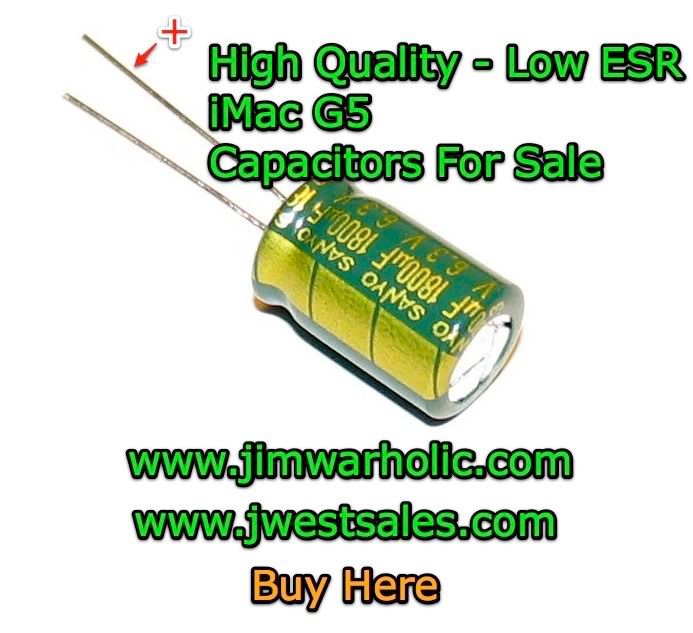 When installing the new capacitors, the positive lead is the longer lead, and the negative lead is the shorter lead. The capacitors have a long wide line printed on the side, that matches up to the negative lead on the capacitor. This must be properly aligned with the proper holes on the power supply printed circuit board. Make sure the capacitors are installed properly. The circuit board is typically marked with a circle of where the capacitors mount, and the positive or negative terminal is also indicated on the PCB. *Warning: If you install the capacitors in backwards, they will become damaged or explode when the unit is turned on. Making this mistake, can also damage other components in your iMac. So, pay attention, and be careful. If you are not sure, take a picture of your own power supply before you start working on it, so you can reference the old ones with the new ones.
I suggest you replace one capacitor at a time, so you do not mix up which one goes where. Another warning. Don’t make this mistake of installing them in the wrong location, because the power supply will not function properly.
In addition, be aware that there are surface mount components on the bottom of the PCB. Be careful when soldering. A standard 60/40 or lead free rosin core solder may be used, however, be aware that the original solder on the circuit board was lead free solder, and the two different alloy types melt at different temperatures, which can easily result in cold solder joints when using a lead solder instead of lead free solder for reworking the board. Do not use acid core or acid flux with your solder. Damage to the circuit board will result if you use the wrong solder core type. I do recommend using lead free solder for the best reworked solder joints. Refer to the lead free soldering tips article for more detailed information.
Please be aware that not all the power supplies can be repaired with just the capacitors being replaced. Sometimes a power supply blows something else besides the capacitors. Diodes, rectifiers, transistors, resistors, and surface mount components can go bad because of the iMac G5 capacitor failures. I will say this though, there is a high degree of success in replacing the caps on the Power Supply Units. The caps on the PSUs are actually easier to unsolder and solder on the printed circuit board as compared to the MOB caps.
LED Indicator Lights on Motherboard Main Logic Card

The LEDs on the main logic board (motherboard or MOB) indicate the following:
- LED #1 means it is detecting trickle voltage from the power supply unit, PSU. If you don’t see this LED, with the machine off but plugged in, it is not a good candidate for PSU repairs unless fuse is blown on the PSU itself, and the PSU should be replaced in this case. Also note that seeing LED #1 on, does not mean the PSU is completely good.
- LED #2 comes on when the MOB sees all the correct powers (proper voltages present from PSU).
- LED #3 indicates the computer and LCD are talking (communicating) OK.
- LED #4 is strictly an overheating indicator LED, and should not go on under normal circumstances.
Notice the slight bulging of the capacitors on the main circuit board above. This indicates that these are bad capacitors and the MOB capacitors should be replaced at this time. Keep in mind, both the PSU and the MOB caps can be bad at the same time. Refer to the repairing the iMac G5 article for more information.